Can Claude make a dashboard?
Yes. Claude Dashboards, in beta on paid plans, charts a connected data warehouse or app, each chart showing its query. superagnt_ adds dashboards on the Postgres tables your agents fill, built from any MCP client and shareable as a public link that opens without an account.
In the run below, Claude wrote the queries and a view over a signups table and published them in about 6 seconds of tool time. A row added later showed up in the next preview, with nothing rebuilt.
Connect superagnt_ to Claude
Copy the setup prompt.
Your agent does the rest.
Install superagnt for me. It's the superagnt plugin from the github.com/superagnt/plugins marketplace, plus the superagnt MCP server (on Claude it's a connector I add in my browser; elsewhere I sign in through my browser). The setup guide for each kind of agent is at https://www.superagnt.com/install» the base connection already serves the workspace dashboard and database. Nothing to switch on.
What Claude does alone, and what changes once it's connected
| job | Claude on its own | with superagnt_ |
|---|---|---|
| Charts on your data | Claude Dashboards (beta; Pro, Max, Team and Enterprise) charts a connected warehouse such as BigQuery, Snowflake or Redshift, or an app you connected. | Views on your superagnt_ database tables, plus your account's credits, usage and agent runs, each chart fed by a named SQL query. |
| Who can see it | Dashboards start private to you; Share opens them up. Shared artifacts need a Claude account to open. | Published for everyone in the workspace. A member can share one view as a public link: anyone opens it, live and read only, with no account. |
| Built from | The Claude apps. | Any MCP client: Claude, Claude Code, ChatGPT or Codex, through agnt_dashboards_write. |
| Fresh numbers | Each chart shows when its data was last refreshed. | The view's queries run against the live tables: new rows show up within about five minutes for people in the workspace and for public links, and at once in Claude's preview. |
The job, run on superagnt_
Real tool calls on superagnt_'s staging environment, the same calls Claude makes once the server is connected. Each result is what the client received, trimmed where it says so and otherwise unchanged, and each wall time was measured around the call.
“Build a dashboard on my signups table: the total, signups per day, and the latest ten. Publish it for the team.”
- 01Write a query over the signups table2.2 s wall time→ call
agnt_dashboards_write{ "action": "write_file", "path": "queries/signups_by_day.sql", "content": "-- New signups per day, from the signups table.\nselect signed_up::date as day, count(*) as signups\nfrom signups\ngroup by 1\norder by 1\n", "intent": "A signups view: total, signups per day and the latest rows, from the signups table." }← result{ "saved": true, "path": "queries/signups_by_day.sql", "issues": [ { "file": "queries/signups_by_day.sql", "line": null, "severity": "warning", "code": "tree.unused_query", "message": "No view reads this query. Bind it with query=\"signups_by_day\", or delete this file." } ], "other_issues": 0, "columns": [ { "name": "day", "type": "time" }, { "name": "signups", "type": "number" } ], "sample_rows": [ [ "2026-10-19", 1 ], [ "2026-10-20", 2 ], … ] }» Trimmed: the draft id and three of the five sample rows.
- 02Write the view665 ms wall time→ call
agnt_dashboards_write{ "action": "write_file", "path": "views/signups.html", "content": "<section style=\"display:grid;gap:16px\">\n <div style=\"display:grid;grid-template-columns:repeat(2,minmax(0,1fr));gap:16px\">\n <sa-value label=\"Signups\" query=\"signups_total\" field=\"total\" emphasis></sa-value>\n <sa-value label=\"Newest signup\" query=\"signups_total\" field=\"newest\" format=\"date\"></sa-value>\n </div>\n <sa-chart label=\"Signups per day\" query=\"signups_by_day\" kind=\"bar\" x-field=\"day\" y-fields=\"signups\" x-format=\"date\"></sa-chart>\n <sa-table label=\"Latest signups\" query=\"signups_latest\" columns=\"name,company,title,signed_up\" labels=\"Name,Company,Title,Signed up\" formats=\"text,text,text,date\"></sa-table>\n</section>\n" }← result{ "saved": true, "path": "views/signups.html", … "issues": [ { "file": "views/signups.html", "line": null, "severity": "warning", "code": "manifest.missing_view", "message": "Add \"views.signups\" with a title to dashboard.json." } ], "other_issues": 0 }» Trimmed: the draft id. Two more query files and dashboard.json were written the same way, 0.6 to 0.9 seconds each.
- 03Publish it for the workspace988 ms wall time→ call
agnt_dashboards_write{ "action": "publish", "summary": "New Signups view: total, signups per day and the latest rows from the signups table." }← result{ "published": true, … "seq": 1, "changed_paths": [ "dashboard.json", "queries/signups_by_day.sql", "queries/signups_latest.sql", "queries/signups_total.sql", "views/signups.html" ], "warnings": [], … }» Trimmed: the version id and the link into the staging app.
- 04Later: A new signup lands in the table1.5 s wall time→ call
agnt_db_write{ "action": "insert", "table": "signups", "rows": [ { "name": "Ivy Chen", "email": "ivy@relecloud.example", "company": "Relecloud", "title": "CTO", "signed_up": "2026-10-26" } ] }← result{ "success": true, "affected_row_count": 1, "note": "Rows omitted to keep the response small. Pass `return_rows: true` if you need the inserted/updated row data." } - 05Later: Look at the published view5.3 s wall time→ call
agnt_dashboards_read{ "action": "preview", "view": "signups" }← result{ "view": "signups", "title": "Signups", "source": "published", "version": 1, "rendered": true, "report": "Rendered \"Signups\" (published version 1) at 1280x800. 3 queries: signups_total 1 row, signups_by_day 7 rows, signups_latest 8 rows. No runtime errors.", "queries": [ { "name": "signups_total", "rows": 1 }, { "name": "signups_by_day", "rows": 7 }, { "name": "signups_latest", "rows": 8 } ], "problems": [], … "width": 1280, "height": 800 }» Trimmed: the PNG itself (shown below) and the links into staging.
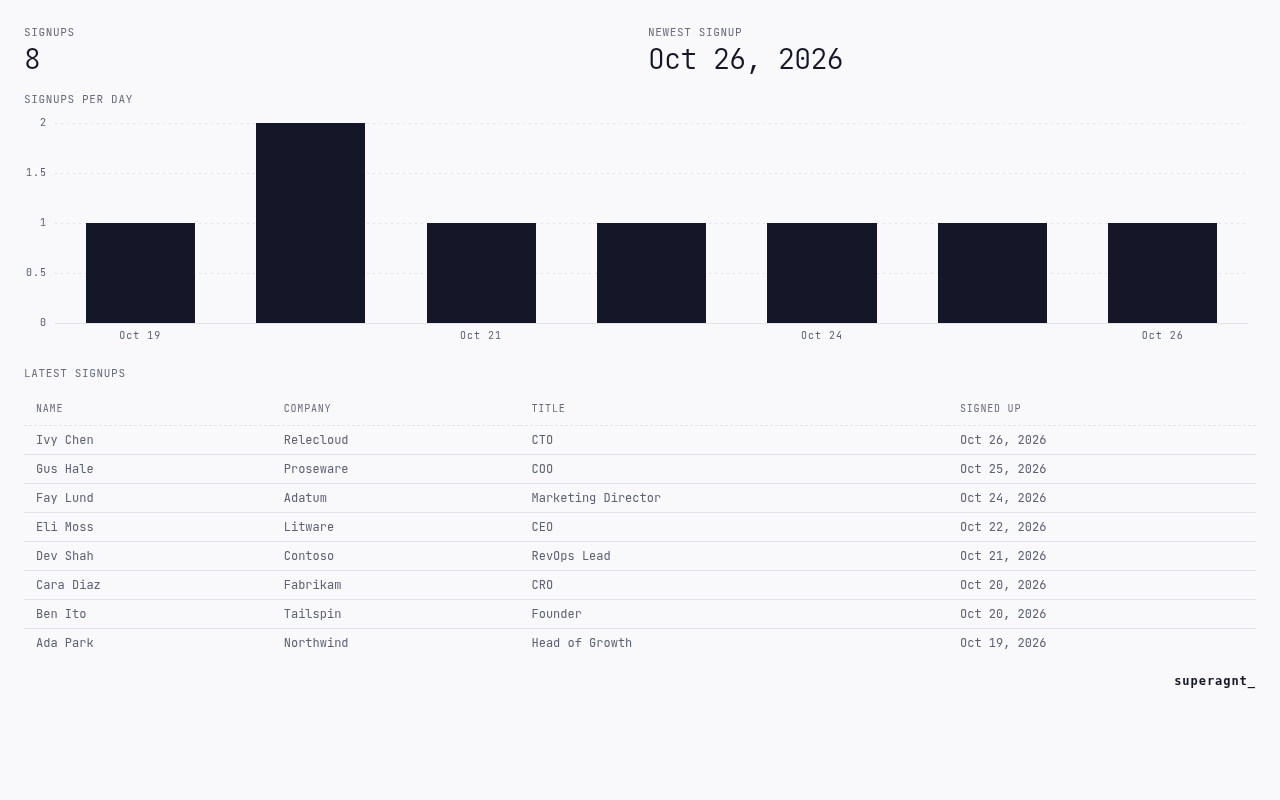
Building took five file writes and a publish, 6.3 seconds in all, and the save checks flagged each query until a view used it. A preview takes about 5 seconds because it renders the page. The count went from 7 to 8 without touching the dashboard.
Set it up in your client
Claude
- 01Open the prefilled Add custom connector dialog on claude.ai. One connector covers Claude on the web, Claude Desktop and Cowork.
- 02Click Add, then approve on the superagnt_ consent screen. It creates your superagnt_ account if you don't have one.
- 03Ask: “Build a dashboard on my signups table: the total, signups per day and the latest ten. Publish it for the team.”
Free plans can add one custom connector. On Team and Enterprise plans, an owner adds it under Organization settings, Connectors (Anthropic).
Claude Code
- 01In Claude Code, run
/plugin marketplace add superagnt/plugins, then/plugin install superagnt@superagntfor the superagnt_ skills. - 02Add superagnt_ to Claude as a connector with the prefilled dialog and click Add. Claude Code signed in with your Claude account picks it up.
- 03Start a new session.
- 04Ask: “Build a dashboard on my signups table: the total, signups per day and the latest ten. Publish it for the team.”
ChatGPT
- 01In ChatGPT on the web, go to Plugins, select the plus button, then Add custom MCP server.
- 02Name it superagnt, enter the server URL under Connection, and set Authentication to OAuth. The server URL is
https://mcp.superagnt.com/mcp. - 03Tick "I understand and want to continue", then select Create as a plugin. Sign in to superagnt_ when asked. No token needed.
- 04Install the plugin, then start a new chat, type @ and select superagnt.
- 05Ask: “Build a dashboard on my signups table: the total, signups per day and the latest ten. Publish it for the team.”
ChatGPT takes custom MCP servers on the web, not on mobile, and only Business and Enterprise/Edu workspaces get write actions. On Pro, connected servers are read and fetch only, so building and publishing a dashboard needs one of those plans in ChatGPT (OpenAI).
Codex
- 01In a terminal, run
codex mcp add superagnt --url https://mcp.superagnt.com/mcp, thencodex mcp login superagnt. The login opens a browser to approve. - 02Start a new Codex session.
- 03Ask: “Build a dashboard on my signups table: the total, signups per day and the latest ten. Publish it for the team.”
Common questions
01Can Claude make a dashboard?
Yes. Claude Dashboards, in beta on paid plans, charts a connected warehouse or app. With the superagnt_ MCP server, Claude builds dashboards on the Postgres tables your agents fill, from any MCP client, and a person can share a view as a public link.
02Does the dashboard update by itself?
Yes. The view's queries run against the current tables, so new rows show up without a rebuild: within about five minutes for people in the workspace and for public links, which reuse a recent result, and at once in Claude's preview. In the run, a row inserted after publishing was in the next preview.
03Can people without an account see it?
Yes, through a public link a workspace member turns on for one view. Anyone with the link sees it live and read only.
04What can a chart show?
Numbers, meters, status lights, lists, sparklines, line, area, bar and funnel charts, and tables with a CSV download, each fed by a named SQL query over your tables or by platform data such as credits, usage and agent runs.
What else Claude can do with superagnt_
- Can Claude search Twitter?
- Can Claude read Reddit threads?
- Can Claude watch YouTube videos?
- How do I get a YouTube transcript into Claude?
- Can Claude find email addresses?
- Can Claude save data between chats?
- Can Claude load a CSV into a database?
- Can Claude run tasks on a schedule?
Go deeper: Dashboards docs · Postgres database for AI agents · Workspace database docs