Best LinkedIn Scrapers 2026: 24 Tools, Priced Per Profile
A LinkedIn scraper pulls public profiles, companies, jobs and posts from LinkedIn into CSV or JSON. We checked 24 scrapers' pricing pages: the median entry plan costs $12.35 per 1,000 profiles, and 13 of 24 need your own LinkedIn account.
By Jaen, founder of superagnt // updated
Disclosure: superagnt is one of the 24 tools in this comparison. We priced and classified it with the same rules as every other tool.
Every "best LinkedIn scraper" list prices tools in a different unit: per month, per seat, per credit, per execution hour, per 1,000 records. You can't compare them, and the figures are often months out of date. Pick the wrong type and you pay many times more per profile, or you hand your own LinkedIn account to someone else's automation. This guide puts 24 tools on one unit (dollars per 1,000 profiles), one date (prices checked October 13, 2026 and re-checked October 18) and one question that matters for your account: does the tool need your LinkedIn login?
What is a LinkedIn scraper, and what data can it pull?
A LinkedIn scraper is a tool that pulls information from LinkedIn pages (profiles, company pages, job posts, posts, and the people who engage with them) and turns it into structured rows, typically CSV or JSON. Some of these tools work from outside LinkedIn by reading public pages. Others run through your own logged-in account. That choice sets what you can reach and how much risk you take on.
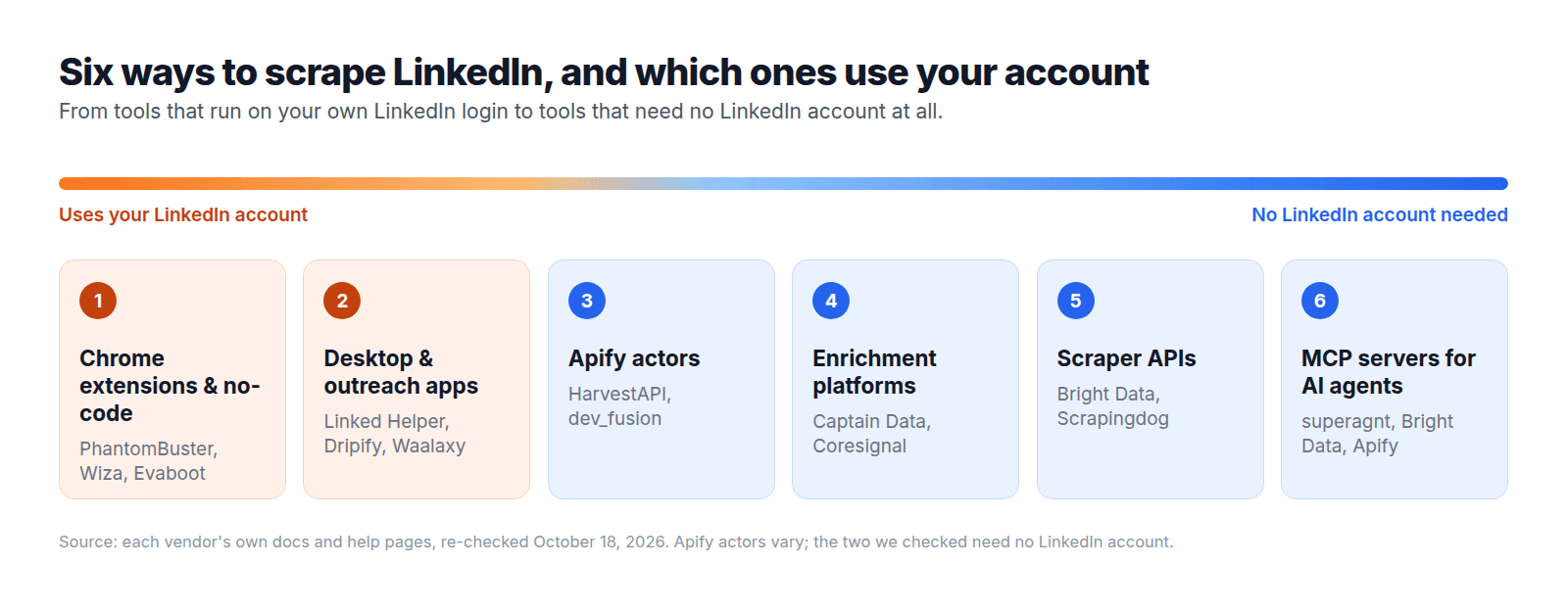
The tools split into six types: Chrome extensions and no-code cloud tools, desktop and outreach apps, marketplace actors on Apify, enrichment platforms that sell records by the credit, scraper APIs that return JSON from public pages, and MCP servers that let an AI agent call LinkedIn tools directly. The first two categories always use your own LinkedIn account; in the other four it depends on the tool, so the account section lists every one. The rest of this guide follows that six-way split.
What each tool type can pull, based on the vendors' own documentation:
| Data type | Scraper APIs | Apify actors | Extensions / no-code | Enrichment platforms | MCP servers for agents |
|---|---|---|---|---|---|
| Profiles | Yes | Yes | Yes | Yes | Yes |
| Company pages | Yes | Yes | Some | Yes | Yes |
| Job posts | Yes | Yes | Some | Some | Yes |
| Posts and comments | Yes | Yes | Yes | Some | Yes |
| Post likers and commenters | Some | Yes | Yes | Some | Yes |
| People search | Limited (login wall) | Some | Yes (your account) | Some | Yes |
| Emails | No (separate lookup) | Add-on | Add-on | Yes | Add-on |
| Phone numbers | No | Add-on | Some | Yes | Some |
LinkedIn profiles don't display emails or phone numbers, so any tool that hands them back is running a second lookup somewhere else (more on that below).
LinkedIn's own walls are why the tool type matters. Scrapfly reports that an anonymous visitor hits a sign-in prompt after roughly three to five profiles (Scrapfly, October 2026). LinkedIn also caps a regular search at about 1,000 results and a Sales Navigator search at 2,500 leads (Linked Helper, Evaboot).
Scraping public pages at scale demands the tool's own infrastructure to get around those limits. Run the tool on your account instead, and it inherits your account's limits.
Which LinkedIn scraper should you use?
Which LinkedIn scraper fits you hinges on two questions: how many profiles you pull each month, and whether you're willing to run the tool through your own LinkedIn account. We pulled every figure below from the vendors' own pricing pages on October 13, 2026, re-checked each one on October 18, and every one reflects monthly billing.
| Tool | Best for | Type | Entry price | Per 1,000 profiles | Needs your LinkedIn account? | Official MCP |
|---|---|---|---|---|---|---|
| superagnt | AI agents that search, enrich and save LinkedIn data (Claude, ChatGPT, Cursor) | MCP server + API | Starter $49/mo with $20 data credits; $0.009 per successful call | $22.05 (data at $9 per 1,000 calls) | No | Yes |
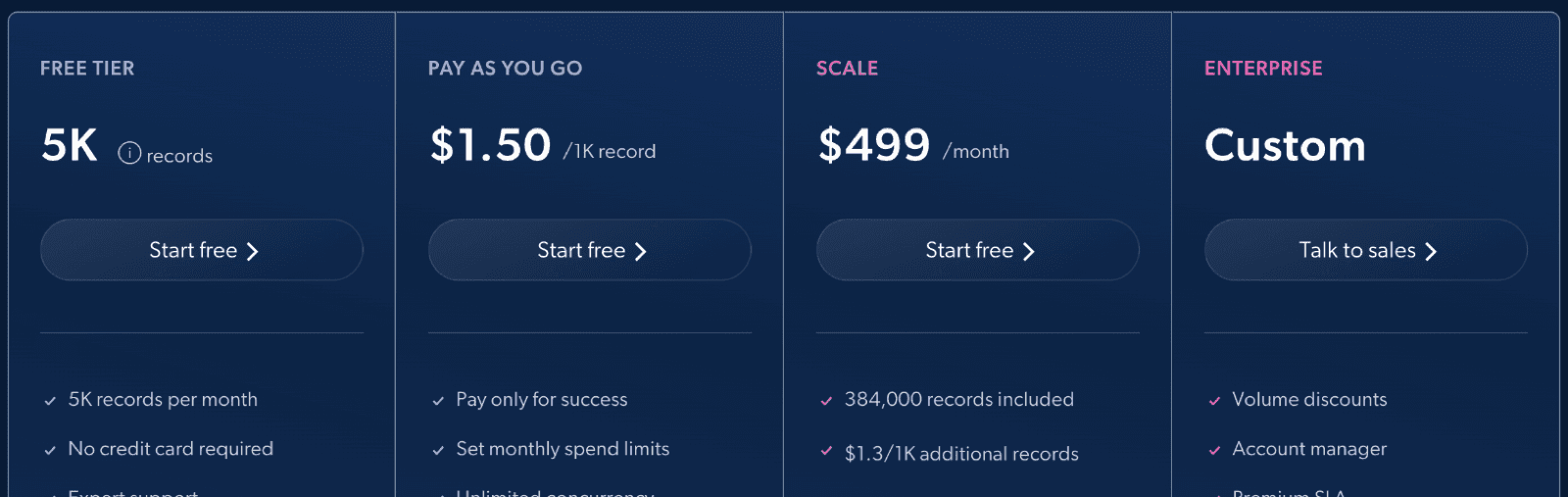
| Bright Data | 10,000+ profiles a month | Scraper API | Pay as you go, $1.50 per 1,000 records; 5,000 records free each month | $1.50 | No | Yes |
| HarvestAPI on Apify | Small to mid batches without code | Marketplace actor | $4 per 1,000 profiles, run on Apify Starter ($19/mo) or the $5 free monthly credit | $4.00 | No | Yes (Apify MCP) |
| Derrick | Enriching lists in Google Sheets | Enrichment platform | Standard €20/mo, 10,000 credits | $2.24 | Yes (your session cookie) | Plus plan (€47.50/mo) and up |
| Scrapingdog | A drop-in profile API | Scraper API | Lite $40/mo, 200,000 credits at 50 per profile | $10.00 | No | Yes |
| Captain Data | Multi-step enrichment workflows | Enrichment platform | Bronze €150/mo, 2,500 credits | $67.13 | No | Yes |
| Evaboot | Sales Navigator lists with verified emails | Chrome extension | $29/mo for 400 credits, plus a paid Sales Navigator seat | $72.50 | Yes (Sales Navigator seat) | Yes |
| Wiza | Emails and phones from LinkedIn | Chrome extension | Starter $49 per user/mo, 100 valid emails | Priced per email (see study) | Yes (your browser session) | Yes |
| PhantomBuster | Automation chains (search, profiles, post engagers) | No-code cloud | Start $69/mo, 20 hours of execution time | Not published | Yes (your session cookie) | Yes |
| Linked Helper | Outreach plus scraping from a desktop app | Desktop app | Standard $15/mo per LinkedIn account | Not published | Yes (your login) | No |
| Lindy | Asking in Slack and pushing results to a CRM | AI assistant (no-code) | Team $29.99 per user/mo, credit-based | Not published | Not stated | No (MCP client only) |
| joeyism/linkedin_scraper | Python developers | Open-source library | Free | n/a | Yes (your login) | No |
Every source link and the complete 24-tool dataset live in the study section. If all you need is a starting point, use the picker below:
- An AI agent does the work: superagnt. One MCP connection gives Claude, ChatGPT or Cursor 52 LinkedIn endpoints, an email finder and a database to save rows into, billed only on successful calls. Bright Data and Apify also run MCP servers if all you need is raw records.
- Under 500 profiles a month: pay nothing. Run the test on Apify's free monthly credit, Derrick's 100 free credits or Bright Data's free monthly records, with no card required.
- 500 to 10,000 profiles a month: an Apify actor such as HarvestAPI, or Derrick if your list lives in Google Sheets and you're fine running it on your LinkedIn session.
- 10,000+ profiles a month: a scraper API priced per record, such as Bright Data or Scrapingdog.
- Sales Navigator lists: Evaboot, provided a Sales Navigator seat is already on your bill.
Settle three questions before you commit:
- Whose account does it use? If the answer is yours, budget for the risk covered in the account section. If it's none, the vendor carries the infrastructure.
- What unit do you pay in? Records, profiles and calls let you price a job before you run it. Hours, seats and generic credits don't.
- Where does the data go next? A spreadsheet-ready CSV, rows pushed into a CRM, or a table an AI agent can query. The destination decides between an extension, an enrichment platform and an MCP server.
ChatGPT answers this same query with "Apify for small jobs, Bright Data for scale". Our data supports the second half of that. For small jobs, Derrick's Standard plan comes in cheaper per profile than HarvestAPI on Apify, as long as credits and handing over your LinkedIn session cookie don't bother you. Neither half covers a third case: an AI agent running the search itself. That is the job superagnt is built for, and the agent section walks through it.
What does a LinkedIn profile really cost? We checked 24 scrapers' pricing pages
Across the 10 scrapers that publish a profile allowance, the entry plan costs a median $12.35 per 1,000 profiles, and the cheapest and priciest differ by 261 times.
How we did it. We checked 24 LinkedIn scrapers: every tool named on the pages Google's AI Overview and ChatGPT cite for "linkedin scraper", the top organic comparison pages, plus superagnt. Apify counts as two entries, HarvestAPI and dev_fusion, because Apify's price depends on the actor. We used only each vendor's own pricing, docs and help pages, all checked on October 13, 2026 and re-checked on October 18, 2026. For each tool we took the cheapest paid option billed monthly (pay-as-you-go when it has no monthly fee), divided its price by the profiles it includes, and multiplied by 1,000. We converted euros at the European Central Bank's October 13 rate of 1.1188. Tools priced per email or per export are reported separately, and plans sold in execution hours or tasks are counted as "no profile count", because converting them would mean guessing.
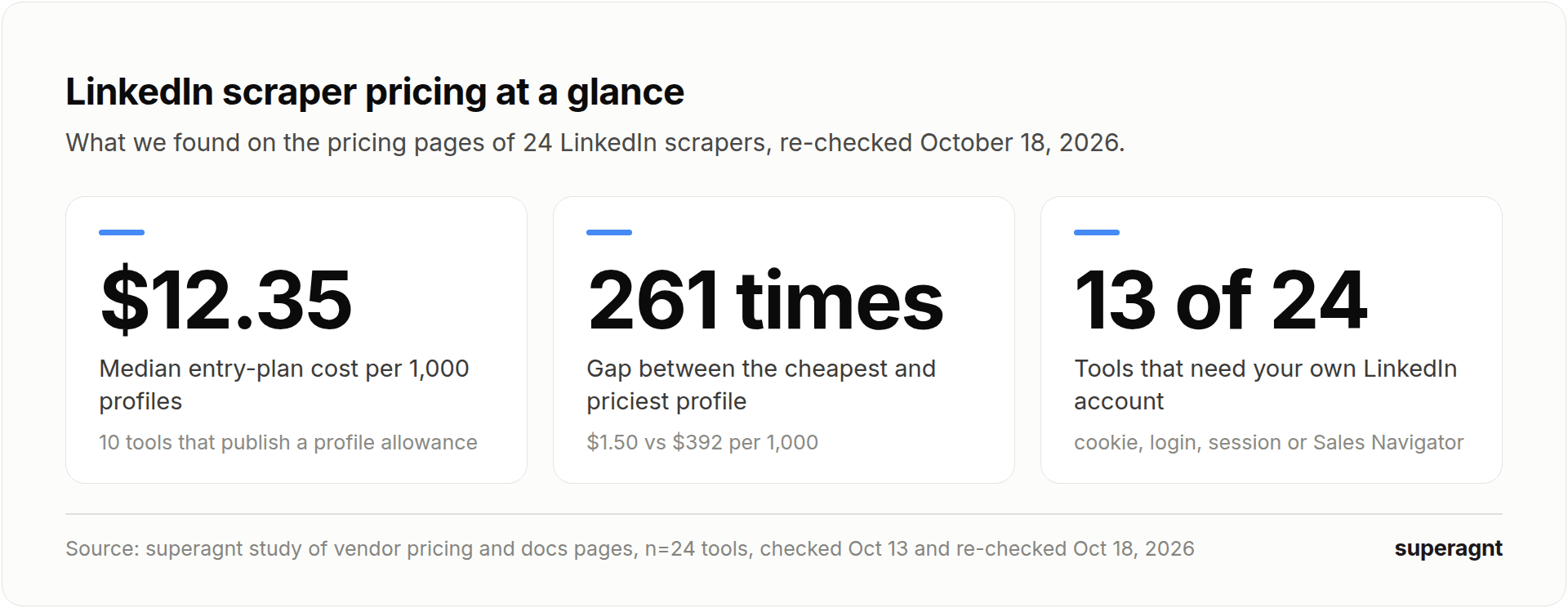
Finding 1: most scrapers don't tell you what a profile costs. Only 10 of 24 tools publish enough to work out a per-profile price. 11 tools publish no profile or contact allowance at all: they sell execution hours (PhantomBuster), tasks (Octoparse), seats (Linked Helper, Dripify, Waalaxy) or generic API credits whose cost per LinkedIn page depends on rendering (Scrapfly, ZenRows, Oxylabs). With those tools you learn the real price after you run a job.
Finding 2: the same profile costs from $1.50 to $392 per 1,000. Bright Data's pay-as-you-go rate is the cheapest. Coresignal's Mini plan is the most expensive, because 2,500 credits at 20 credits per full profile record buys 125 profiles (a record with only the core fields costs 10 credits, still $196 per 1,000). superagnt's Starter plan works out to $22.05 per 1,000 because the $49 buys an agent platform, not only data: 3 deployed agents, 10 schedules and a Postgres database, with $20 of data credits included. The data itself bills at $9 per 1,000 successful calls, below the entry-plan rates of Scrapingdog ($10.00) and ScraperAPI ($14.70), and failed calls aren't billed.
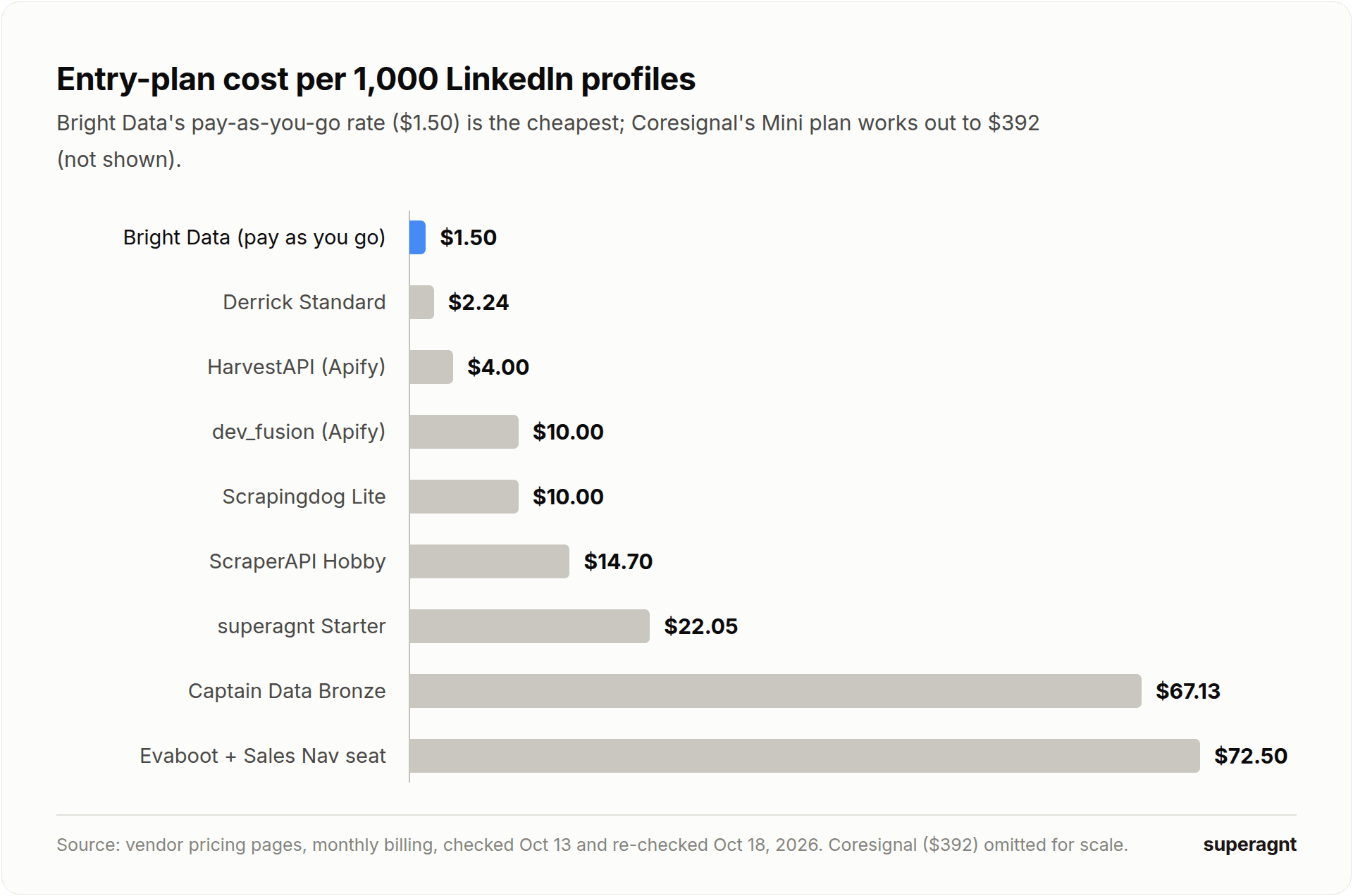
| Tool | Entry option used | Per 1,000 profiles | Source |
|---|---|---|---|
| Bright Data | Pay as you go | $1.50 | brightdata.com |
| Derrick | Standard (€20, 10,000 credits) | $2.24 | derrick-app.com |
| HarvestAPI (Apify) | $4 per 1,000 profiles | $4.00 | apify.com |
| dev_fusion (Apify) | $10 per 1,000 results | $10.00 | apify.com |
| Scrapingdog | Lite ($40, 50 credits per profile) | $10.00 | scrapingdog.com |
| ScraperAPI | Hobby ($49, 30 credits per LinkedIn request) | $14.70 | scraperapi.com |
| superagnt | Starter ($49 with $20 credits, $0.009 per call) | $22.05 | superagnt.com |
| Captain Data | Bronze (€150, 2,500 credits) | $67.13 | captaindata.com |
| Evaboot | 400 credits ($29), Sales Navigator seat extra | $72.50 | evaboot.com |
| Coresignal | Mini ($49, 2,500 credits, 20 per full record) | $392 | coresignal.com |
Three tools price per contact rather than per profile. Wiza's Starter plan works out to $490 per 1,000 valid emails, Kaspr's Starter plan to $65 per 1,000 exports and Skrapp's Professional plan to $19.50 per 1,000 emails.
Finding 3: the comparison pages are often wrong about price. 16 tools had at least one price on the comparison pages Google and ChatGPT cite that the vendor's own page contradicts. A few examples (comparison pages read on October 13, vendor pages re-checked on October 18, 2026):
| Tool | What a cited comparison page says | What the vendor's page says |
|---|---|---|
| PhantomBuster | $69/mo "for 10 hours of execution" | $69/mo for 20 hours |
| Apify | entry plan $29 or $39/mo | Starter $19/mo |
| Derrick | entry plan €9/mo for 4,000 credits | Standard €20/mo for 10,000 credits |
| Dux-Soup | €12.99 or $14.99/mo | $55/mo per seat (now sold as STACKED) |
| ZenRows | Developer plan $69/mo | Developer is a legacy plan; entry plan Build $19/mo ($69 now buys Launch) |
A worked example. For a 2,000-profile list, Bright Data's pay-as-you-go rate comes to $3.00 (nothing at all if the list fits in its 5,000 free records a month) and HarvestAPI to $8.00. On superagnt the 2,000 calls cost $18, which fits inside the Starter plan's $20 of monthly data credits, and the rows land in a table your agent can query on its next run.
What this means for you:
- Price the unit you'll actually buy. Per-record pricing (Bright Data, Apify actors, superagnt) tells you the cost before you run; hour-, seat- and task-based plans don't.
- Check the vendor's own page before you trust a listicle's number, including this one: the date at the top is the day we last checked these prices.
- Prefer pay-per-success billing. Bright Data, superagnt and most Apify actors only charge for records they return, so failed lookups cost nothing.
Best LinkedIn scraper APIs: Bright Data, Scrapingdog, ScraperAPI and Scrapfly
Scraper APIs had some of the lowest per-profile prices in our study ($1.50 to $14.70 per 1,000 among those that publish one), and only ScraperAPI's profile tutorial asks for a LinkedIn login.
Bright Data
Bright Data is best for teams that need 10,000 or more profiles a month and want to pay only for records that come back. Its LinkedIn Scraper API covers profiles, companies, jobs, posts and people search, runs on what it describes as a network of 400M+ IPs, and restricts collection to "publicly available data" (Bright Data). A hosted MCP server comes bundled, and its docs carry setup notes for Claude Code, Codex and Cursor. What comes back is JSON; deduplication, enrichment and outreach are yours to wire up afterward.
Scrapingdog
Pick Scrapingdog when all you need is one profile endpoint billed in credits. The company states that neither your cookies nor any LinkedIn account come into play (Scrapingdog). Do the sums before committing, though: pulling a single LinkedIn profile eats 50 credits on its plans, and 100 for a protected one. The per-profile figure is the number to compare; the headline credit total hides the real cost.
ScraperAPI
Developers hand-rolling a Python scraper will like ScraperAPI, since proxies and rendering get handled for them. On its plans, one LinkedIn request sets you back 30 credits. Markdown output is on offer too, which saves a step when the results head straight into an LLM. One caveat: the LinkedIn profile tutorial on its own site logs into an account, so for profile data it sits in the "needs your account" category.
Scrapfly
Scrapfly aims at engineers happy to receive raw pages and write the parsing logic in-house. You can pull profiles, companies and jobs without logging in; people search, Scrapfly notes, won't work that way. Scrapfly doesn't publish a per-profile cost; the credits each page burns depend on your rendering and proxy settings.
Apify LinkedIn scrapers: what we found running HarvestAPI on 20 profiles
Apify runs as a marketplace, so the LinkedIn scraper you get hinges on the actor you pick: HarvestAPI bills per profile and needs neither cookies nor a LinkedIn account. Apify itself operates an official MCP server, which lets an agent invoke any actor directly.
On October 13, 2026 we ran the same list of 20 public profile URLs of well-known executives through HarvestAPI's LinkedIn Profile Scraper. It returned 17 of 20 profiles; the other three came back "Profile not found". The run took 12.4 seconds, and the 17 profiles cost $0.068 at the actor's per-profile rate.
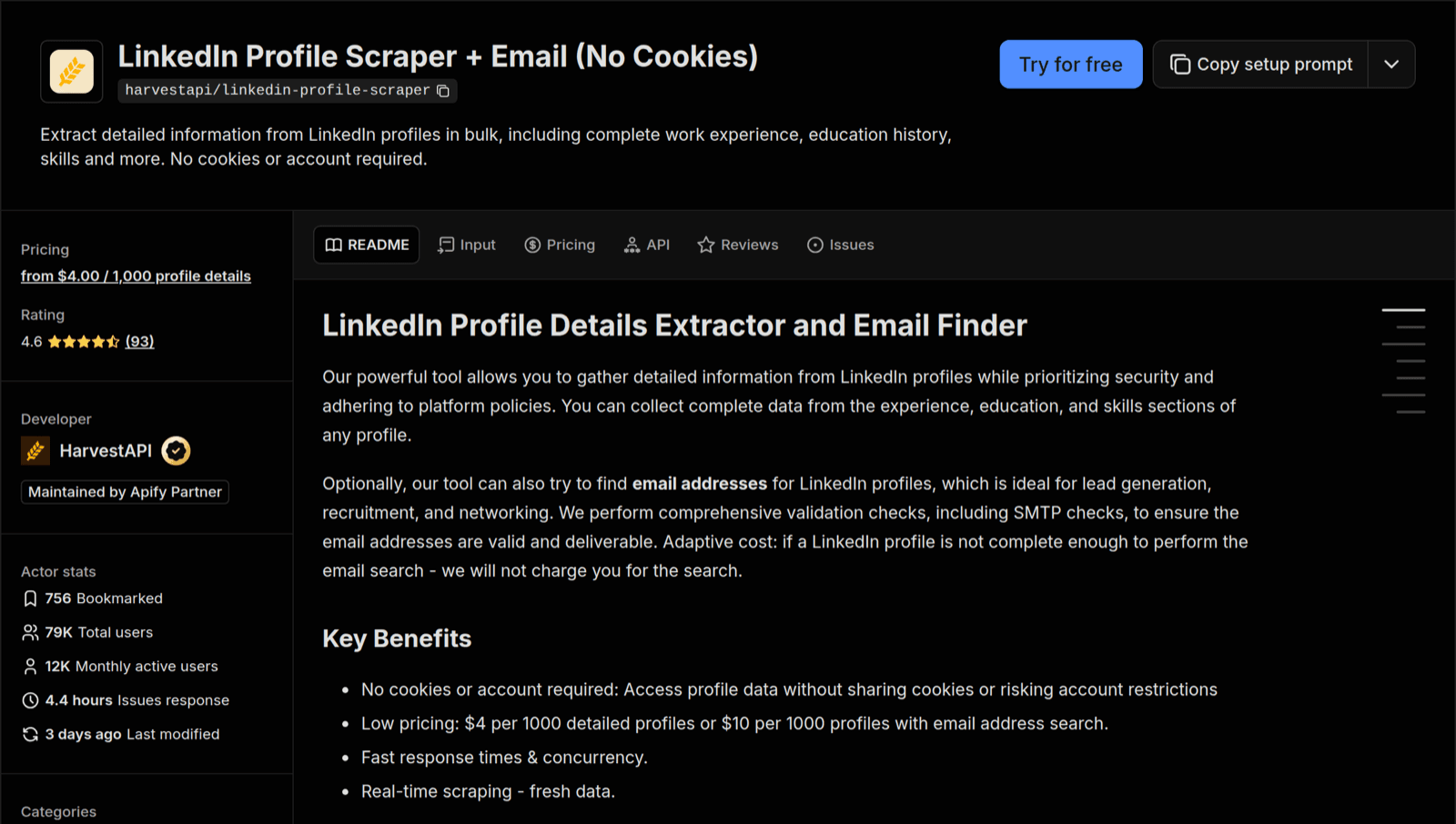
Each returned profile carried work history, education, skills and location, plus follower and connection counts, across 238 possible fields. Most outreach tools export less. We publish none of the profile data and report the counts only.
Two findings only showed up because we ran it:
- Public profiles can still come back with empty fields. Several of the profiles we pulled listed zero skills even though those profiles are public. Run a small batch first and confirm the fields you need before you buy at volume.
- One popular actor insisted on full access to our Apify account. We also gave dev_fusion's Mass LinkedIn Profile Scraper a try; its listing advertises "No Cookies". Apify would not start it until we granted the actor full access to our Apify account, a condition that surfaces only when you press Run, never on the listing. We declined to grant it.
Best no-code and Chrome-extension LinkedIn scrapers
No-code and Chrome-extension scrapers are the easiest place to start, but almost all of them operate through your own LinkedIn account, so that account is what ends up at risk.
PhantomBuster
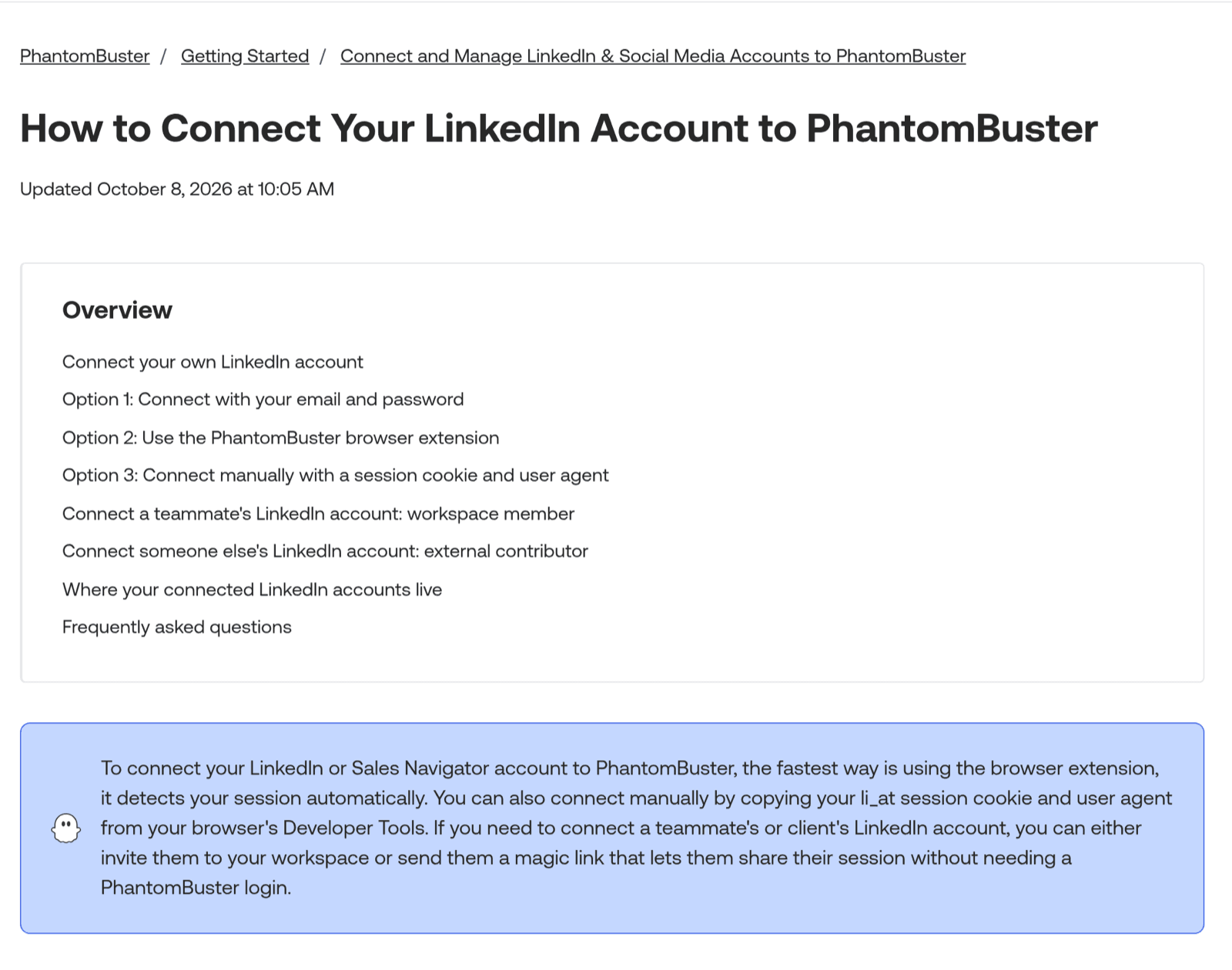
PhantomBuster is the strongest option for chained workflows: run a search export, open each profile, then gather everyone who liked or commented on a post. A single profile scrape can return as many as 75 data points (PhantomBuster). The downside: it signs in to LinkedIn as you (your email and password, its browser extension or your session cookie), and because plans are sold in execution hours, you can't work out the per-profile cost in advance.
Evaboot
Evaboot is the pick for exporting Sales Navigator lead lists complete with verified emails. A single credit gets you a lead plus that lead's verified email, and a lead with no email found still uses the credit. The catch: it sits on top of a paid Sales Navigator seat, and the per-profile price in our table doesn't include that seat.
Wiza
Wiza is the one to pick when the email address or phone number matters more than the profile itself. You pay per valid email found, which is why our study prices it per contact. According to its help center, Sales Navigator bulk export was removed on August 19, 2026 (Wiza).
Linked Helper, Dripify, Waalaxy and Dux-Soup
All four are outreach platforms that scrape as a side job: they open profiles, send invitations and export whatever they see, always from your own account, whether that's a desktop app or a cloud session tied to it. Pricing runs per seat or per LinkedIn account, so none of them quotes a per-profile cost. Only go with one of these when outreach is the main job.
Octoparse
Octoparse is for anyone who wants point-and-click scraping with no code involved. Both of its own help-center tutorials, the one for LinkedIn jobs and the one for posts, begin by logging into a LinkedIn account (Octoparse), so assume you'll be using your own login.
Lindy
Lindy suits teams that want to ask for LinkedIn data inside Slack and watch it land in their CRM. It bills in credits per user. Its own guide says LinkedIn has to be connected first, but not whether collection runs through your LinkedIn session, so we classed it "not stated".
Best LinkedIn data and enrichment platforms: Derrick, Captain Data, Coresignal
Derrick, Captain Data and Coresignal each sell LinkedIn data by the record or credit. Captain Data and Coresignal never touch your LinkedIn account, which makes them the safe middle ground between scraper APIs and extensions; Derrick runs its LinkedIn enrichment on your own session cookie.
Derrick
Pick Derrick when your list lives in Google Sheets: paste in profile URLs and it fills the columns for you. It came in second-cheapest per profile in our study, and its MCP server becomes available on the Plus plan. The catch: its own help center says profile enrichment "cannot be used without a valid li_at", your LinkedIn session cookie (Derrick), so the scraping runs on your account.
Captain Data
Captain Data suits multi-step enrichment workflows that run on a schedule, and every plan comes with an MCP server. Its smallest plan, Bronze, is €150 a month for 2,500 credits at the full rate of €59.99 per 1,000; at 20,000 credits (Silver, €600) the rate halves, so it suits teams with a steady volume more than a one-off test.
Coresignal
Coresignal sells pre-collected datasets of employee, company and job records, with an API on top. Lookups come back fast because the data was gathered before you asked for it, though each record reflects when Coresignal last collected it rather than the moment you ask. On its Mini plan it is the most expensive per profile in our study, since a full employee record costs 20 credits (10 for the core fields alone). That pricing makes more sense for bulk dataset purchases than for small lookups.
How do you give Claude (or any AI agent) LinkedIn data?
Connect an MCP server that exposes LinkedIn tools. Your agent then calls them like any other tool, and 19 of 24 scrapers we checked offer an official one.
| MCP server | LinkedIn coverage | Auth | Needs your LinkedIn account? | Price unit | Plan |
|---|---|---|---|---|---|
| superagnt | 52 endpoints: profiles, companies, people search, jobs and hiring teams, posts, reactions, articles | OAuth 2.1 or API key | No | Per successful call | All plans |
| Bright Data | Profiles, companies, jobs, posts, people search | API key | No | Per record | All plans |
| Apify | Whatever the actor covers | OAuth or API token | Depends on the actor | Per actor result | All plans |
| Derrick | Profiles, companies, emails, phones | API key | Yes (session cookie) | Credits | Plus and up |
| PhantomBuster | Its automations | OAuth | Yes (session cookie) | Execution time | All plans |
| Evaboot | Sales Navigator exports, emails | OAuth or API key | Yes (Sales Navigator) | Credits | All plans |
| Coresignal | Employee, company and job datasets | OAuth | No | Credits | All plans |
Two comparison pages that Google cites tell different stories about PhantomBuster and Apify MCP support. Each vendor documents one on its own site, so both made the list.
Risk stays the same with an agent in the loop. Lindy says it plainly in its own guide: "The AI layer doesn't change the account risk." Your account is exposed if the MCP server under your agent runs on your LinkedIn cookie, and it doesn't matter whether you or Claude kicks off the run.
What to check before you connect a LinkedIn MCP server
- Which LinkedIn account it runs on. A server built on top of a cookie-based automation inherits that automation's ban risk.
- How calls are priced and when billing happens. Per-call and per-record rates keep agent spend predictable, and success-only billing means you never pay for retries or dead profiles.
- How many tools you get. One generic "scrape URL" tool forces the agent to parse pages itself. Named tools (profile by URL, company by domain, hiring team) hand it structured data instead.
- Where the results end up. Holding thousands of rows in the agent's context window makes runs slow and expensive. A database the agent can write to gives those rows a home outside the chat.
Of the servers in the table, superagnt is the one that checks all four. The difference is the last item: results go into a Postgres database in your workspace, so the agent can filter, dedupe and come back to them on the next run instead of re-pulling the same profiles.
Walkthrough: Claude pulling LinkedIn hiring signals with superagnt
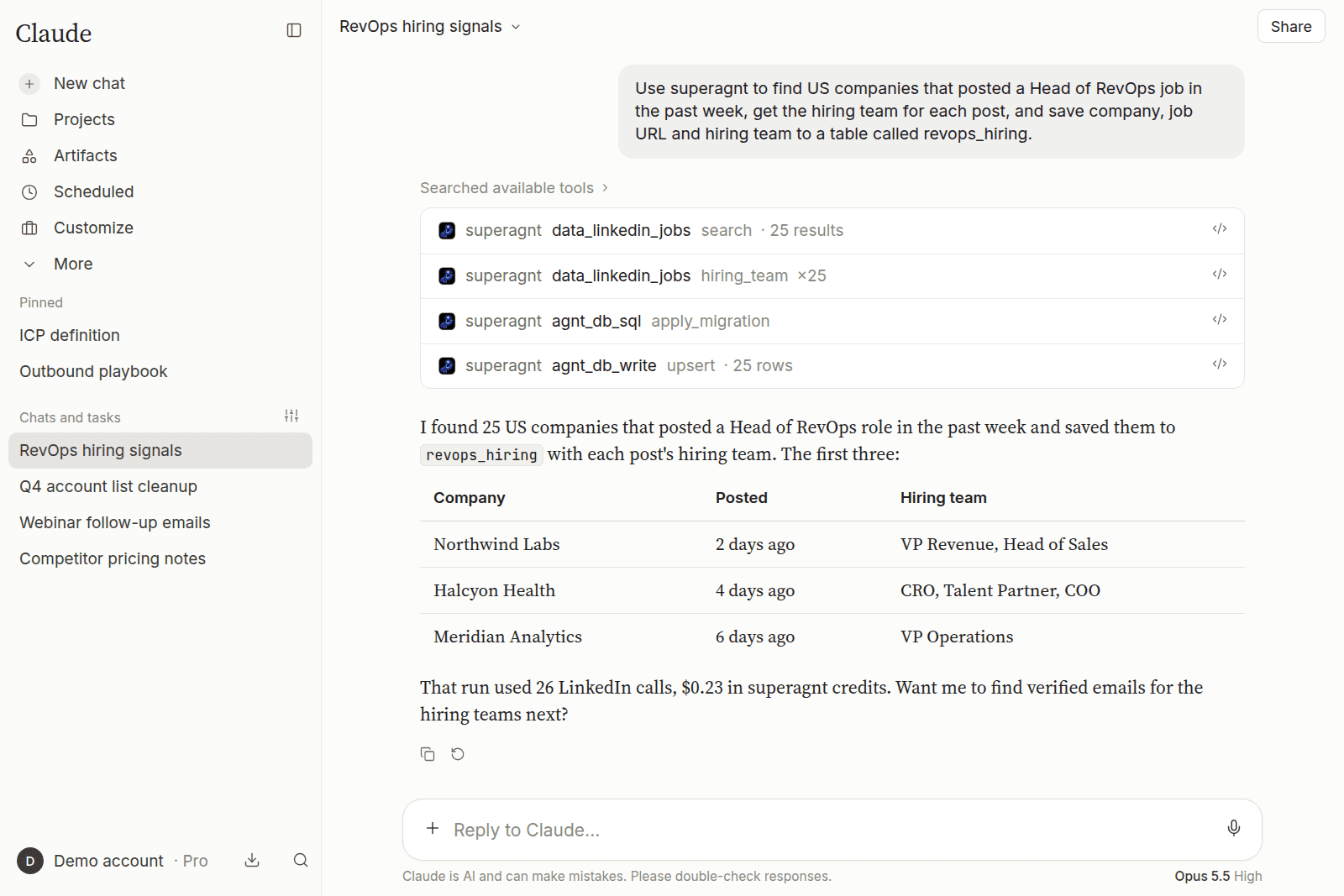
The job: surface US companies with an open Head of RevOps role, identify the people on each hiring team, and store everything in a table.
- Connect once. In Claude, add
https://mcp.superagnt.com/mcpas a custom connector (Settings → Connectors) and approve the OAuth screen; no token goes into a config file. Claude Code, Cursor, ChatGPT and other clients have their own quick-start guides on the install page. - Ask in plain English. "Find US companies that posted a Head of RevOps job in the past week, get the hiring team for each post, and save company, job URL and hiring-team names to a table called revops_hiring."
- The agent selects the tools. Claude calls
data_linkedin_jobswith thesearchaction to pull the posts, runs itshiring_teamaction against each one, and saves the rows into the workspace's Postgres database. - Only successful calls are billed. In this example, one search call returns 25 job posts and 25 hiring-team lookups follow: 26 calls, or $0.23 in total. Failures cost nothing.
The LinkedIn API docs cover all 52 LinkedIn endpoints. If assembling the workflow yourself sounds like work, superagnt also ships prebuilt agents, including the LinkedIn hiring-signal scraper and the LinkedIn engager scraper.
Give your agent LinkedIn data in one connection.
52 LinkedIn endpoints, an email finder and a database for the results, at $0.009 per successful call. No LinkedIn account, no cookie, nothing billed for failed lookups.
Can you build your own LinkedIn scraper in Python?
Yes. Libraries like joeyism/linkedin_scraper get the job done, but they authenticate as you, which puts your own account on the line.
joeyism/linkedin_scraper (version 3.1.2) uses Playwright and Pydantic to pull person profiles, companies, job listings and company posts. Its README is direct about the catch: "LinkedIn requires authentication." You supply your credentials or a saved session, with proxies on top once volume grows. Licensing needs a look too: the repo declares GPL-3.0 in the licence file and Apache 2.0 in the README, so verify the terms before any commercial use.
A scraper API called from your script is the alternative if you want Python without the login. Your code stays compact: post a profile URL to the API, receive JSON and push the fields you need into a CSV or database. The logic stays yours (which profiles, how often, what to keep) while the vendor takes care of proxies, rendering and LinkedIn's sign-in wall. When LinkedIn reshuffles its layout, the vendor's parser absorbs the breakage instead of yours. The top YouTube results for this query are n8n tutorials doing the same job with no-code nodes.
Is scraping LinkedIn legal?
After hiQ Labs v. LinkedIn, scraping public LinkedIn data is unlikely to count as a computer crime under the US Computer Fraud and Abuse Act; it still breaches LinkedIn's User Agreement, though, and LinkedIn enforces that agreement in court.
- The law (US). On April 18, 2022, the Ninth Circuit kept hiQ's preliminary injunction in place, seeing a serious question over whether scraping publicly available profiles amounts to access "without authorization" under the CFAA (Ninth Circuit opinion). On the contract side, the same case turned against hiQ: a district court held in November 2022 that hiQ had breached LinkedIn's User Agreement, and by December 2022 the matter closed with a $500,000 judgment and a permanent injunction against hiQ (Proskauer).
- The User Agreement. Section 8.2 of LinkedIn's User Agreement (effective November 3, 2025) bars using software, scripts, robots or any other means to scrape or copy profiles and other data.
- Your account. LinkedIn's help page on prohibited software and extensions states that third-party software which scrapes or automates activity on the site is not permitted, and that accounts running it risk restriction or shutdown.
Privacy law applies no matter which tool you use: collect data about people in the EU or California and GDPR or the CCPA governs what you can store and how you can use it. Treat this as general information rather than legal advice.
Will LinkedIn ban your account for scraping?
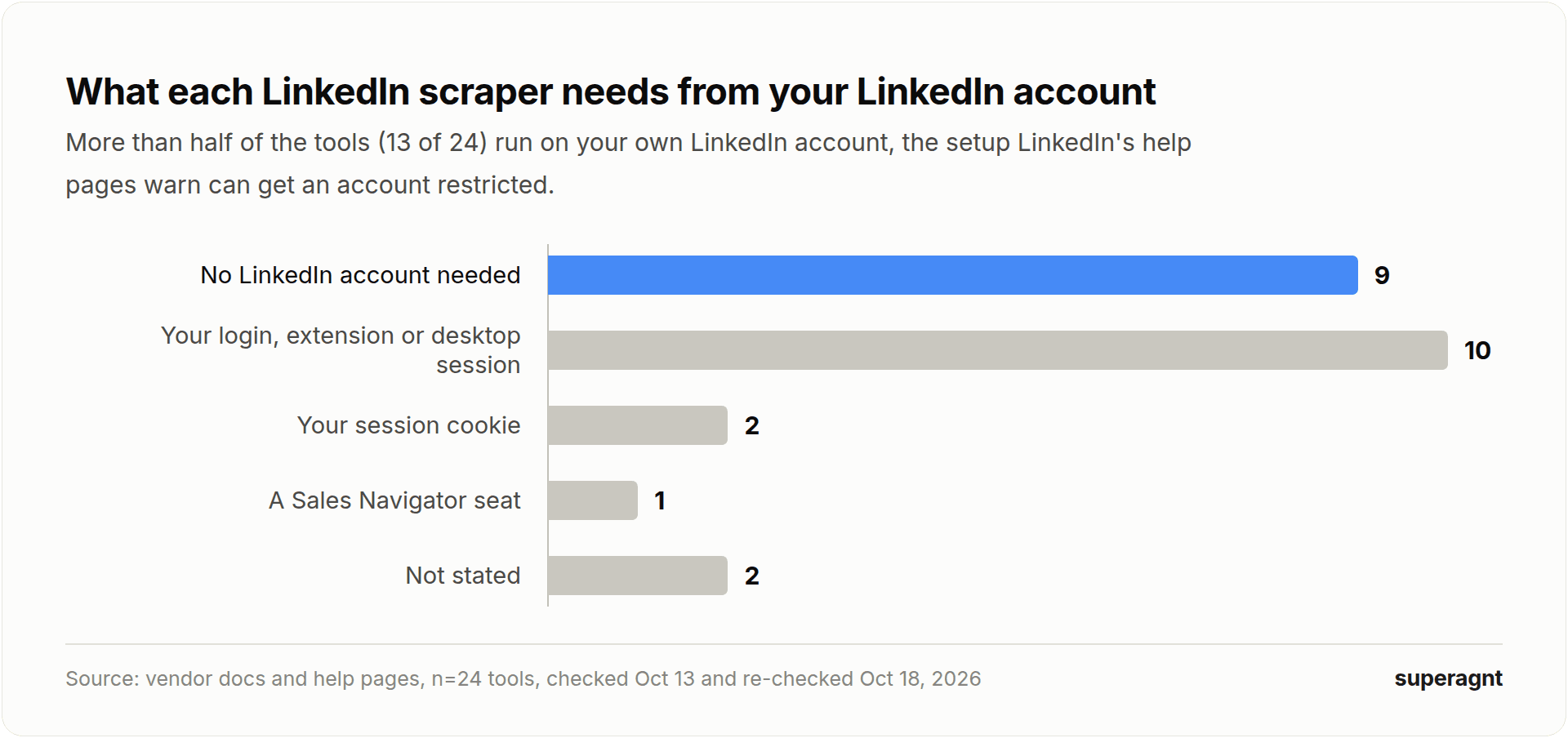
It can. LinkedIn restricts accounts that run prohibited automation, and 13 of 24 tools we checked run on your account.
| What the tool needs | Tools |
|---|---|
| No LinkedIn account | superagnt, Bright Data, HarvestAPI, dev_fusion, Scrapfly, Captain Data, Coresignal, Scrapingdog, ZenRows |
| Your login, browser extension or desktop session | Wiza, Octoparse, ScraperAPI (profile tutorial), Linked Helper, Dripify, Waalaxy, Dux-Soup, Kaspr, Skrapp, joeyism/linkedin_scraper |
| Your session cookie | PhantomBuster, Derrick |
| A Sales Navigator seat | Evaboot |
| Not stated | Lindy, Oxylabs |
LinkedIn never publishes exact thresholds. Its account-restrictions help page says automated-tool violations can bring a temporary or permanent restriction, and members who believe they were flagged by mistake are asked to verify their identity on screen (LinkedIn Help). If a verification prompt appears after a scraping session, shut the tool down on that account before you do anything else.
If you run a tool on your own account anyway, respect the limits the vendors themselves publish. PhantomBuster's guidance runs from 80 profiles over 8 launches on a new account up to 300 over 20 launches on Premium (PhantomBuster), while Linked Helper advises no more than 100 to 200 profile visits a day (Linked Helper). The simple rule: collect data with a no-account tool and reserve your own account for outreach.
How do you get emails from LinkedIn profiles?
LinkedIn profiles never display email addresses, so every "LinkedIn email scraper" actually scrapes the profile first and then finds the address through another source.
That scraped profile supplies the two inputs an email finder runs on: the person's full name and the company's website domain. Most finders compare those against known address patterns and public sources, then confirm the mailbox exists before handing back a result.
Your options, ranked roughly by setup effort:
- Bolt an email step onto the scraper you already run. HarvestAPI offers an email-search mode on Apify, while Derrick charges 5 credits for each email found.
- Install an extension built for the job. Wiza and Evaboot return verified emails as you browse or export, all running on your own LinkedIn session.
- Have your agent chain the lookups. With superagnt, the agent pulls the profile or company, then calls the email finder using the person's name and company domain. It checks providers cheapest first, bills only when it finds an address, and gives you no email back instead of a guessed one.
Whatever route you pick, verify the emails before sending anything. A bounced address damages your sending domain more than a missing one does.
What happened to Proxycurl and LinkedIn's APIs?
LinkedIn sued Proxycurl in January 2025, and the popular LinkedIn profile API shut down on July 4, 2025; its founder says the closure was required to comply with a legal settlement with LinkedIn (Proxycurl's announcement). Plenty of teams are now picking a new LinkedIn data source because of it.
Going straight to LinkedIn won't solve it. Every developer can access only the API permissions that return the signed-in member's own name, headline, photo and email; the marketing, sales and talent APIs all require LinkedIn's approval as a partner, and no LinkedIn API gives third parties a general profile or people search (LinkedIn API docs). That gap is why the market runs on scraper APIs, data platforms and tools that work through your own account.
Replacing Proxycurl means matching the three things it gave you: profile lookups by URL, no LinkedIn account on your side, and per-record pricing. Bright Data, Scrapingdog and superagnt are the entries in our table that check all three boxes. superagnt also covers the work-email lookups many Proxycurl customers used, through the same API key.
How we compared LinkedIn scrapers (methodology)
Our candidate list came from every LinkedIn scraper mentioned on the pages Google's AI Overview and ChatGPT cited for "linkedin scraper" on October 13, 2026, plus the top organic comparison pages, with superagnt added on top. The result: 24 entries, with Apify appearing twice because its price depends on the actor.
For each tool we used only the vendor's own pricing, docs and help pages, checked on October 13, 2026 and re-checked on October 18, 2026. Prices use monthly billing; euros were converted at the European Central Bank's October 13 rate of 1.1188. The re-check corrected three entries: Captain Data's cheapest monthly plan is Bronze (€150 for 2,500 credits), not Silver; Derrick's own help center says its LinkedIn enrichment runs on your session cookie, which moves it into the needs-your-account group; and Dripify and Waalaxy both document official MCP servers, which makes 19 of 24 tools with one.
"Per 1,000 profiles" is the entry option's price divided by the profiles it includes, times 1,000. Tools priced per contact are reported separately, and time-, seat- or task-based plans aren't converted. "Needs your LinkedIn account" uses each vendor's own description of how the tool connects. "Official MCP" goes only to a server the vendor documents itself.
The hands-on test pushed 20 public profile URLs through HarvestAPI on Apify on October 13, 2026; we publish counts, time and cost only.
We make superagnt, and it went through every rule above. Six tools come in cheaper per raw profile; none of those six gives an AI agent LinkedIn data, an email finder and a database through one connection. The date at the top is the last day we re-checked every price.
Common questions
01What is the best free LinkedIn scraper?
For a no-cost test, Bright Data gives 5,000 records a month, Apify's free plan includes monthly usage credit (about 1,250 HarvestAPI profiles), and Derrick gives 100 credits a month. Open-source libraries are free too, but they log in as you.
02What is the best LinkedIn scraper for Claude or ChatGPT?
One that connects as an MCP server and needs no LinkedIn account. superagnt gives the assistant 52 LinkedIn endpoints, an email finder and a database for the results, billed at $0.009 per successful call. Bright Data and Apify also run MCP servers if all you need is raw records.
03Is there a LinkedIn scraper that doesn't need my LinkedIn account?
Yes. 9 tools in our study need no LinkedIn account, including superagnt, Bright Data, the no-cookie Apify actors, Scrapingdog and Captain Data. The full list is in the account section.
04Can I scrape LinkedIn Sales Navigator?
Yes, with tools that work on top of your own Sales Navigator seat, such as Evaboot. Expect LinkedIn's limit of about 2,500 leads per Sales Navigator search.
05Does LinkedIn have an official API for profile data?
Not for general use. LinkedIn's open API permissions only return the signed-in member's own basic profile; everything else is limited to approved partners and specific products, which is why scraper APIs and data platforms exist.
06Can ChatGPT or Claude scrape LinkedIn by themselves?
No. They need a tool connection, usually an MCP server or an API, that returns LinkedIn data. Once one is connected, the assistant can search, look up profiles and save results on its own.
07How often do LinkedIn scraper prices change?
Often. 16 tools in our study had a price on a cited comparison page that no longer matched the vendor's own page, so check the date on any price you read.
One key for every data source your agent needs.
LinkedIn, X, Reddit, Instagram, web search and an email finder through one MCP connection, plus a database and scheduled agents to run the job without you. Starter is $49 a month with $20 of data credits included.