LinkedIn Warm Outbound, as a Grok Bot
New warm leads in your Grok chat every weekday morning, scored, each with a first message drafted.
Free template. It sets itself up in the chat.
searches written from what you sell · buyer language, not vendor jargon
Our SDRs sent 200 cold emails a day. We cut it to 40 warm ones and doubled meetings booked.
214 reactions · 38 comments
Your next 20 customers already commented on someone else's post this week. You just aren't reading it.
1,904 reactions · 240 comments
Firmographics tell you who could buy. Engagement tells you who is thinking about it this week.
1,211 reactions · 156 comments
We stopped buying lists in March. Pipeline is up 40%. The list was the problem the whole time.
321 reactions · 55 comments
Reply rates on our engagement-sourced list: 34%. On the bought list: 3%. Same message. Same week.
402 reactions · 61 comments
We enriched 4,000 leads last quarter. We contacted 400. That's $1,800 of enrichment we lit on fire.
705 reactions · 97 comments
deduped at the source · ICP check runs before enrichment spends anything
HeyReach · Instantly · AgentMail · Gmail · into the one lane you picked
Saw you've been in a lot of the churn conversations lately. Most of it traces back to who the list was built from…
You've been deep in the outbound tooling threads. Honest answer on tools: it depends on where your list comes from…
Saw you've been in the AI SDR conversations. The sourcing side is the whole game, happy to show what we mean…
List quality keeps coming up in the threads you're in. Same scar here. We source from engagement now, want the breakdown?
Your market tells you who's shopping, in public, every day: they react to and comment on posts about the problem. This Bot finds those posts, pulls everyone on them, and scores each person against your buyer. The ones who fit show up in the chat with a first message written from what they engaged with. Everything it learns lives in your superagnt workspace, so run 50 works like run 1.
From template to first leads, in one chat.
- step 1
Make the Bot from the template
Open the template in Grok and make the Bot. Pin it and keep its notifications on: that's how the morning leads reach you.
- step 2
Say "Set yourself up"
It walks you through connecting superagnt, reads your website and drafts who your buyers are. You fix what's wrong, and "looks good" is enough.
- step 3
Get your first warm leads
It runs the first sweep right there, then puts itself on a schedule: every weekday at 9, plus a tune-up on Mondays. Say so to change either.
»Sending comes later. Once 20 or more warm leads are waiting, the Bot offers to connect HeyReach, Instantly, AgentMail or Gmail. It never starts a campaign or sends a message without your "send it".
We run this on ourselves.
Our own LinkedIn account, eight weeks, this exact recipe. We never measured a before for this account, so there's no before-and-after here. The numbers are read straight off the dashboard.
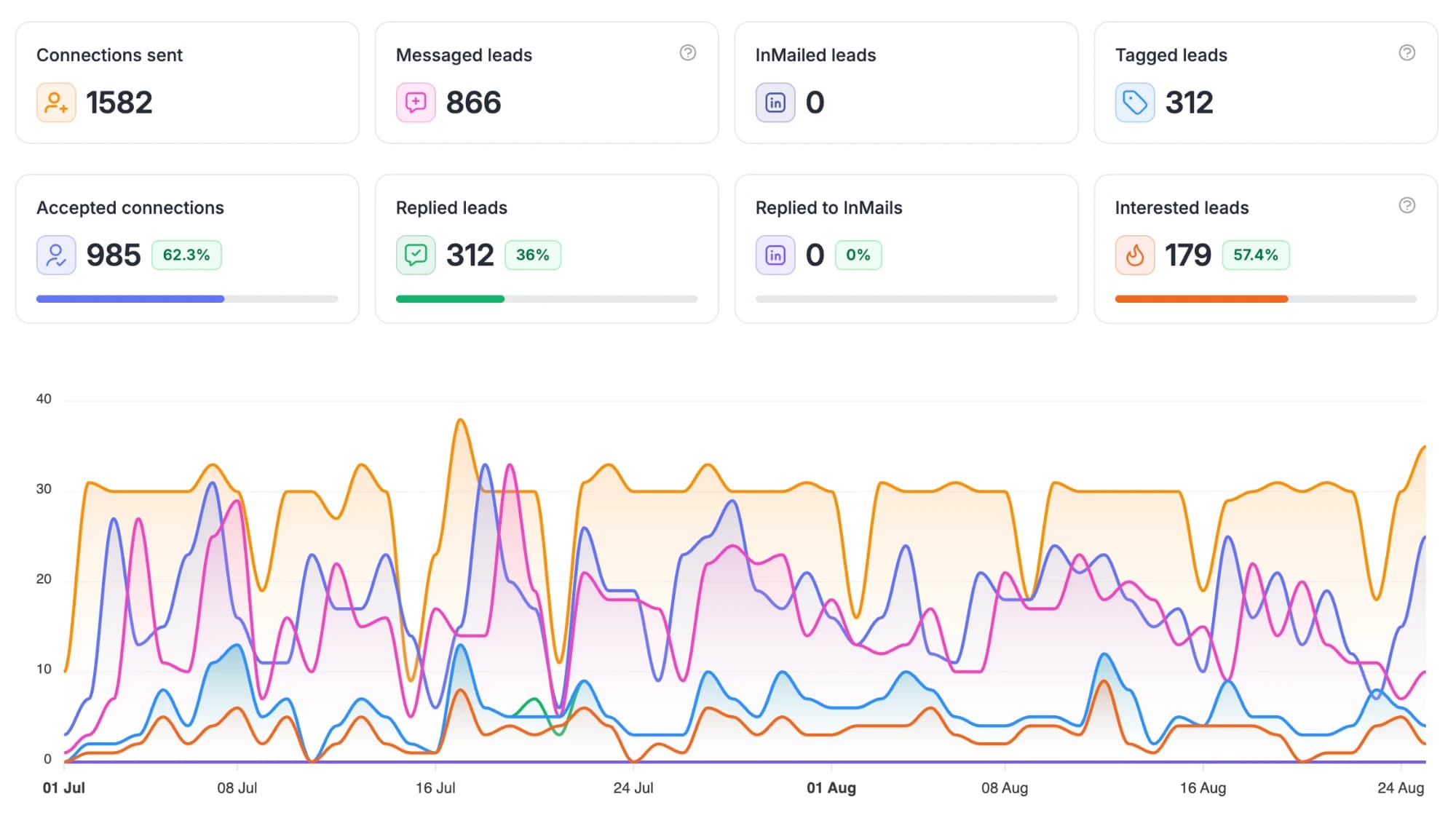
What it runs every weekday, on its own.
- 1
Tell it who buys, once
On setup it reads your website and drafts the answers: who owns the problem, the competitors and creators your buyers follow, your region, and who it should never contact. You only fix what's wrong.
icp_profile · drafted from your siteexamplebuyercategory + retail ops leads at CPG brands
never4 competitors · 3 customers · your team
watch2 competitors · 6 creators
laneheyreach
you correct it once
- 2
Fish where buyers post
Every weekday it writes 3 to 6 fresh LinkedIn searches in the words buyers post in, steered by which past searches found the best leads. Then it takes 3 to 5 well-engaged posts: buyers with the problem right now, the accounts they follow, and the topic itself.
this run's searches, by pondexamplebuyers“hiring a category manager”40%watchlistRivalCo · 2 recent posts30%topic“shelf reset”30%» no term reused inside 14 days
- 3
Pull everyone on the post
The reactors, the commenters, and the author when a buyer wrote it. Each lead keeps what they did, so the message can open on it. Anyone it already has gets skipped.
everyone on one postexample41 reactors · 12 commenters · 1 author» new · Dir. Category, Norrin · wrote the post
» new · Head of Retail, Mesa Co · commented
» new · VP Growth, Halloway · reacted
» dropped · 27 already in your table · 3 competitors
- 4
Score every lead
A narrow gate drops the provably wrong: out of region, fake profiles, your do-not-contact list. Everyone left gets a score from 0 to 100 against your buyer, with the reason written down.
26 new leads · the score gates the spendexampleover 50 · email found + verified14under the bar · nothing spent9gated · wrong region372 · owns category reviews at a 40-store brand, hiring for it
- 5
Bring them to your chat
Each lead over the bar gets a short first message written from what they engaged with. Then the new leads land in the chat: who they are, why they fit, their profile and the message.
first touch · opener: topicexample“Saw you've been in a lot of the category review threads lately. We put together a shelf-gap breakdown for your top SKUs. Want it?”
» the topic, never the creator · one small ask
you approve the first five
- 6
Stage it, never start it
Once you connect a sending tool, each sweep stages its leads there with the campaign stopped, every lead carrying its own message. Pressing start is yours.
staged in the lane you pickedexampleheyreachinstantlyagentmailgmail» 14 leads on the campaign's list, each with its own message
campaign stopped · you press start
- 7
Bring replies to your phone
Every 2 hours on weekdays it reads new replies, stops anyone who asked to stop, and sends you each interested one with an answer drafted. Nothing goes out until you say "send it".
replies, feeding the next runexamplewebhook · Mesa Co replied · interested» answer drafted · waiting on your ok
» “category review” · 31 leads · 9 replies
» “retail media network” · 22 leads · 0 replies
next run writes more like the first
»Every Monday it checks whether the scores are separating buyers from everyone else, and proposes at most one change. Each sweep spends superagnt data credits, and the Bot tells you the weekly number when it schedules itself.
Want it running by tomorrow morning?
Make the Bot from the template, say “Set yourself up”, and the first sweep runs right there in the chat.